
Network Packet Dissection & Protocol Analysis Lab
Deep network visibility is the foundation of network engineering and cyber security. Modern observability requires going beneath high-level HTTP abstractions down to raw Ethernet frames, IP packet headers, TCP window flags, and DNS payload structures.
In this hands-on lab, we build programmatic packet sniffers, dissect the TCP 3-way handshake at the byte level, and construct forensic filters to detect stealth port scans and DNS tunneling attacks.
1. The TCP/IP Protocol Stack & Encapsulation Model
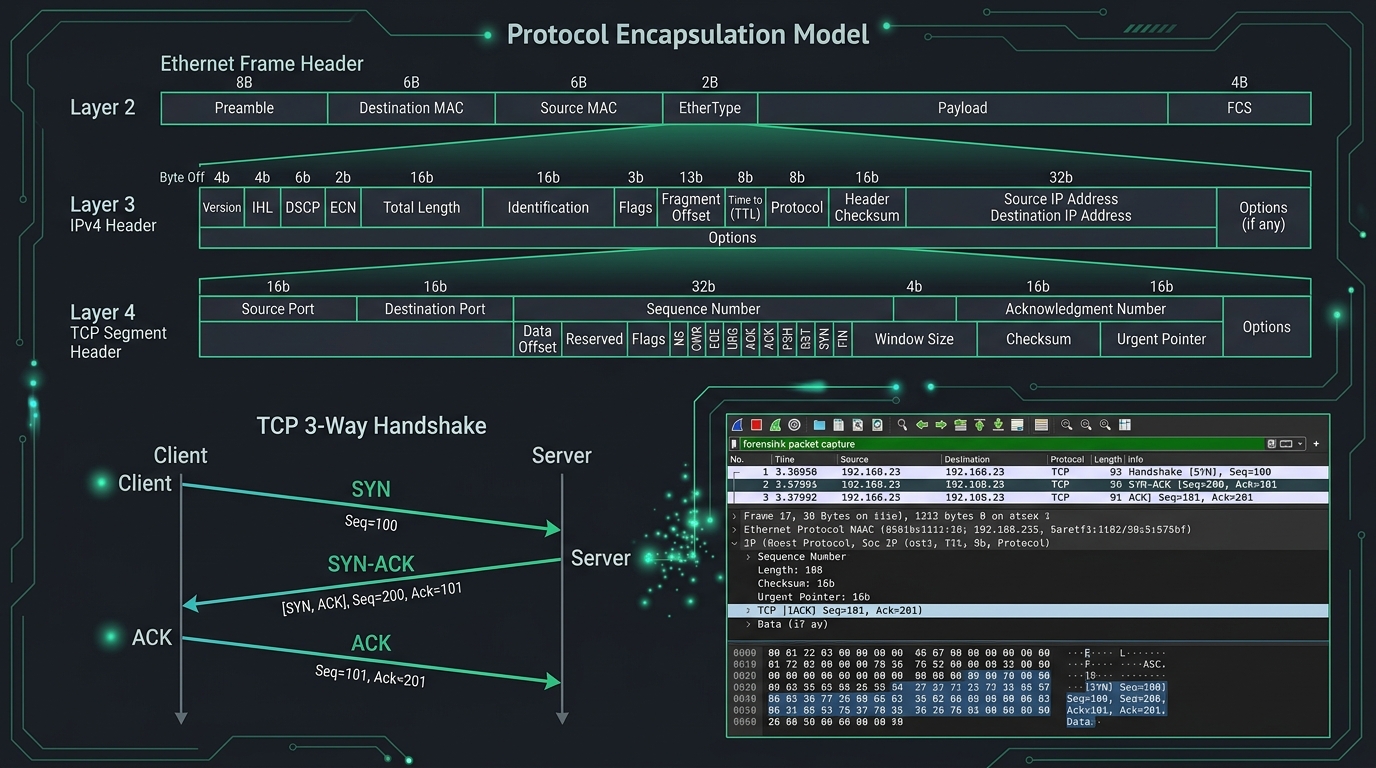 Figure 1: Hierarchical frame encapsulation (Ethernet, IPv4, TCP), TCP 3-way handshake timeline, and Wireshark forensic inspection.
Every network transmission is encapsulated in hierarchical protocol layers. Each layer adds structured headers with specific offsets:
+-------------------------------------------------------------------------+
| Layer 2: Ethernet Frame Header (14 Bytes: Dst MAC, Src MAC, EtherType)  |
+-------------------------------------------------------------------------+
| Layer 3: IPv4 Header (20 Bytes: TTL, Protocol, Src IP, Dst IP, Checksum) |
+-------------------------------------------------------------------------+
| Layer 4: TCP Header (20 Bytes: Src/Dst Ports, Seq/Ack, Flags, Window)   |
+-------------------------------------------------------------------------+
| Layer 7: Application Payload (HTTP / DNS / TLS / Custom Raw Bytes)      |
+-------------------------------------------------------------------------+
Key TCP Header Control Flags
SYN(0x02): Synchronize sequence numbers to initiate a connection.ACK(0x10): Acknowledgment field is significant.FIN(0x01): No more data from sender; graceful teardown.RST(0x04): Reset connection abruptly.PSH(0x08): Push buffered data immediately to receiving application.URG(0x20): Urgent pointer field is valid.
2. Laboratory Environment Setup
To capture raw network packets without running Python as root, grant socket permissions to the Python binary on Linux:
# 1. Install Scapy and Wireshark CLI tools
sudo apt update && sudo apt install -y wireshark tshark python3-scapy

# 2. Grant packet capture capabilities to Python binary (eliminates sudo requirement)
sudo setcap cap_net_raw,cap_net_admin=eip $(readlink -f $(which python3))

# 3. Verify socket permissions
getcap $(readlink -f $(which python3))
3. Programmatic Packet Sniffing with Berkeley Packet Filters (BPF)
Scapy allows high-performance kernel-level filtering using Berkeley Packet Filter (BPF) syntax:
#!/usr/bin/env python3
from scapy.all import sniff, IP, TCP, UDP, DNS, DNSQR

def packet_dissector(pkt):
    """Callback function executed for every captured frame matching BPF filter."""
    if pkt.haslayer(IP):
        src_ip = pkt[IP].src
        dst_ip = pkt[IP].dst
        ttl = pkt[IP].ttl

        if pkt.haslayer(TCP):
            tcp = pkt[TCP]
            flags = tcp.sprintf('%TCP.flags%')
            print(f"[TCP] {src_ip}:{tcp.sport} -> {dst_ip}:{tcp.dport} | Flags: {flags:<4} | Seq: {tcp.seq} Ack: {tcp.ack}")

        elif pkt.haslayer(UDP) and pkt.haslayer(DNS):
            dns = pkt[DNS]
            if dns.qr == 0 and dns.qd: # Query
                qname = dns.qd.qname.decode('utf-8', errors='ignore')
                print(f"[DNS QUERY] {src_ip} asked for: {qname}")

print("[*] Listening on active network interfaces (BPF filter: 'ip and (tcp or udp)')...")
sniff(filter="ip and (tcp or udp)", prn=packet_dissector, store=0)
4. Deconstructing the TCP 3-Way Handshake at the Byte Level
A standard TCP connection requires three distinct segments:
1. Client sends SYN (Seq = $X$)
2. Server responds with SYN-ACK (Seq = $Y$, Ack = $X + 1$)
3. Client completes with ACK (Seq = $X + 1$, Ack = $Y + 1$)
Crafting a Custom SYN Packet in Scapy
from scapy.all import IP, TCP, sr1

target_host = "127.0.0.1"
target_port = 8000

# Step 1: Craft and send SYN packet with random initial sequence number (ISN)
ip_layer = IP(dst=target_host)
tcp_layer = TCP(dport=target_port, sport=54321, flags="S", seq=1000)

print(f"[*] Dispatching SYN to {target_host}:{target_port}...")
syn_ack_response = sr1(ip_layer / tcp_layer, timeout=2, verbose=0)

if syn_ack_response and syn_ack_response.haslayer(TCP):
    resp_tcp = syn_ack_response[TCP]
    if resp_tcp.flags == 0x12: # SYN-ACK (0x02 | 0x10)
        print(f"[+] Received SYN-ACK! Server ISN={resp_tcp.seq}, ACK={resp_tcp.ack}")

        # Step 2: Complete handshake by sending final ACK
        ack_pkt = IP(dst=target_host) / TCP(
            dport=target_port,
            sport=54321,
            flags="A",
            seq=resp_tcp.ack,
            ack=resp_tcp.seq + 1
        )
        print("[+] Connection Established!")
    elif resp_tcp.flags == 0x14: # RST-ACK (Port Closed)
        print("[-] Port is closed (Received RST-ACK).")
5. Detecting Stealth Port Scans & Reconnaissance
Attackers use non-standard TCP flag combinations to evade stateful firewalls:
- SYN Stealth Scan (
-sS): Half-open scan where attacker sendsRSTimmediately after receivingSYN-ACK. - XMAS Scan (
-sX): SetsFIN,PSH, andURGflags simultaneously (looks like a lit Christmas tree). RFC 793 dictates closed ports reply withRST, while open ports drop the packet silently. - Null Scan (
-sN): No flags set at all (flags=0).
Automated Scan Detector Script
from scapy.all import sniff, TCP, IP

def detect_anomalies(pkt):
    if pkt.haslayer(TCP):
        flags = pkt[TCP].flags

        # Check for XMAS scan (FIN + PSH + URG = 0x29)
        if flags == 0x29:
            print(f"[ALERT] XMAS Scan detected from {pkt[IP].src} targeting port {pkt[TCP].dport}")

        # Check for NULL scan (no flags set = 0x00)
        elif flags == 0:
            print(f"[ALERT] NULL Scan detected from {pkt[IP].src} targeting port {pkt[TCP].dport}")

print("[*] Anomaly detection engine active...")
sniff(filter="tcp", prn=detect_anomalies, store=0)
6. Forensics: Identifying DNS Data Exfiltration & Tunneling
Malicious actors encode stolen credentials into subdomains to exfiltrate data through recursive DNS resolvers: eHl6MTIz.malicious-domain.com.
Detection Metrics
- Domain Length: Standard queries average 15-25 characters. Exfiltration subdomains exceed 60 characters.
- Shannon Entropy: High randomness in query labels indicates encrypted or encoded payloads.
import math

def calculate_shannon_entropy(text: str) -> float:
    """Calculates the entropy (randomness) of a domain label string."""
    if not text:
        return 0.0
    entropy = 0.0
    for char in set(text):
        p_x = float(text.count(char)) / len(text)
        if p_x > 0:
            entropy += - p_x * math.log2(p_x)
    return entropy

# Normal domain: 'google.com' -> Entropy: ~2.3
# Encoded tunnel: 'u8f2a9x1m8zq918b7c' -> Entropy: ~4.1
7. Laboratory Verification & Summary
Export captured traffic to standard .pcap files for offline analysis in Wireshark:
# Capture 1000 packets and save to capture.pcap
tshark -i eth0 -c 1000 -w capture.pcap

# Inspect protocol breakdown
tshark -r capture.pcap -q -z io,phs