Building High-Throughput REST APIs with Django & DRF
When scaling Django REST Framework (DRF) services from hundreds to tens of thousands of requests per second, standard Django conventions quickly become architectural bottlenecks. Unoptimized querysets, serialization overhead, synchronous I/O, and naive database transactions create compounding latency cascades.
This guide provides a battle-tested blueprint for engineering high-throughput, low-latency RESTful APIs on top of Django, DRF, and PostgreSQL.
1. System Architecture & The Concurrency Pipeline
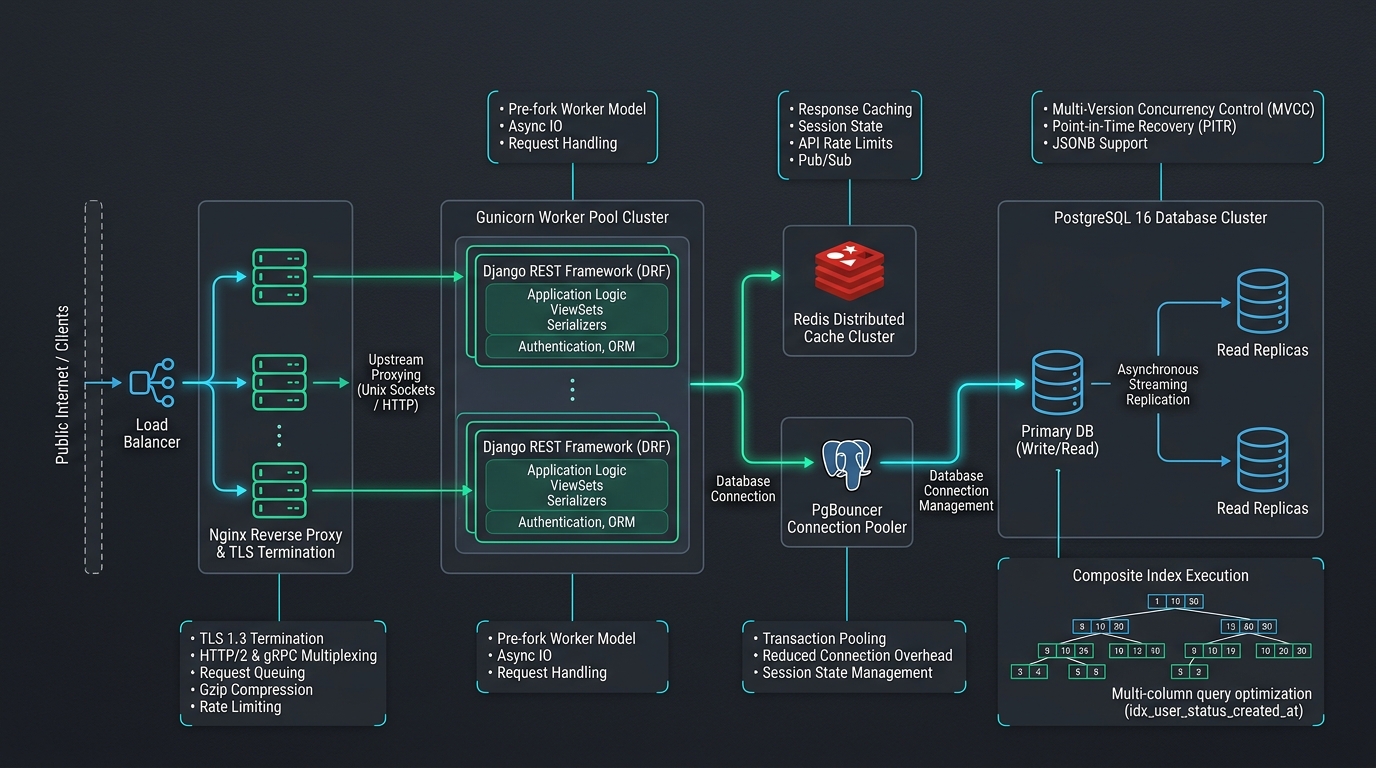 Figure 1: High-throughput DRF request lifecycle, worker clustering, distributed cache, and database connection pooling topology.
In a production deployment, every request traverses a multi-layered infrastructure stack. Latency introduced at any individual stage diminishes overall system throughput.
| Component | Responsibility | Latency Target | Optimization Vector |
|---|---|---|---|
| Reverse Proxy (Nginx) | TLS termination, HTTP/2 multiplexing, static asset caching | < 2ms | Keepalive connection pools, buffer tuning |
| WSGI / ASGI (Gunicorn/Uvicorn) | Process & thread worker pool management | < 5ms | Worker count formula: (2 x $CPUs) + 1 |
| DRF Application Layer | Authentication, permission evaluation, serialization | < 15ms | Lean read serializers, cached lookups |
| Connection Pooler (PgBouncer) | Transaction-mode database connection pooling | < 1ms | Eliminate TCP connection handshake overhead |
| Database (PostgreSQL 16) | ACID storage, query planning & index execution | < 20ms | Composite indexes, zero N+1 queries |
2. Eradicating the N+1 Database Query Anti-Pattern
The most prevalent performance flaw in Django APIs is the N+1 query problem. When serializing collections of relational models, Django's default lazy evaluation executes one primary query plus $N$ supplemental queries for foreign keys or reverse relationships.
The Anti-Pattern (Triggers 101 Database Queries for 100 Orders)
# views.py - ANTI-PATTERN
class OrderViewSet(viewsets.ReadOnlyModelViewSet):
    # Iterating over 100 orders triggers 100 additional queries for customer & items!
    queryset = Order.objects.all().order_by('-created_at')
    serializer_class = OrderDetailSerializer
The Production QuerySet Pattern (Reduces 101 Queries to Exactly 2)
# views.py - PRODUCTION PATTERN
from django.db.models import Prefetch
from rest_framework import viewsets, permissions
from .models import Order, OrderItem
from .serializers import OrderListSerializer

class OrderViewSet(viewsets.ReadOnlyModelViewSet):
    permission_classes = [permissions.IsAuthenticated]
    serializer_class = OrderListSerializer

    def get_queryset(self):
        user = self.request.user

        # 1. select_related for single-valued relationships (SQL INNER/LEFT JOIN)
        # 2. Prefetch with custom filtered queryset for multi-valued relations (batch SQL IN)
        optimized_items_qs = OrderItem.objects.select_related('product').only(
            'id', 'order_id', 'quantity', 'unit_price', 'product__name', 'product__sku'
        )

        return (
            Order.objects.filter(customer=user)
            .select_related('customer')
            .prefetch_related(
                Prefetch('items', queryset=optimized_items_qs)
            )
            .only(
                'id', 'reference_code', 'status', 'total_amount', 'created_at',
                'customer__id', 'customer__email', 'customer__display_name'
            )
            .order_by('-created_at')
        )
Key Rule: Use
select_relatedforForeignKeyandOneToOneField(performs SQLJOIN). Useprefetch_relatedforManyToManyFieldand reverseForeignKeyrelationships (performs a single batchIN (...)lookup).
3. Query Execution Plan Inspection with PostgreSQL
Never guess whether an index is being utilized. Use PostgreSQL's EXPLAIN (ANALYZE, BUFFERS) directly through Django's database connection or the Django shell:
from django.db import connection

query = str(Order.objects.filter(customer_id=42, status='COMPLETED').query)
with connection.cursor() as cursor:
    cursor.execute(f"EXPLAIN (ANALYZE, BUFFERS) {query}")
    plan = cursor.fetchall()
    for line in plan:
        print(line[0])
Adding Composite Functional Indexes
If your query filters by customer and sorts by timestamp, declare a composite B-Tree index in your Django model Meta:
from django.db import models

class Order(models.Model):
    customer = models.ForeignKey('users.User', on_delete=models.CASCADE, related_name='orders')
    reference_code = models.CharField(max_length=32, unique=True)
    status = models.CharField(max_length=20, db_index=True)
    created_at = models.DateTimeField(auto_now_add=True)

    class Meta:
        indexes = [
            models.Index(
                fields=['customer', '-created_at'],
                name='idx_order_cust_created_desc'
            ),
        ]
4. Decoupling Read vs. Write Serializers
ModelSerializers that include full validation logic, relationship resolvers, and dynamic SerializerMethodField calls incur severe CPU overhead when transforming thousands of records.
Always separate your listing payloads from your mutation contracts:
from rest_framework import serializers
from .models import Order, OrderItem

# 1. Ultra-lean serializer for high-throughput collections (GET /api/v1/orders/)
class OrderListSerializer(serializers.ModelSerializer):
    customer_email = serializers.CharField(source='customer.email', read_only=True)
    item_count = serializers.IntegerField(source='items.count', read_only=True)

    class Meta:
        model = Order
        fields = ('id', 'reference_code', 'status', 'total_amount', 'customer_email', 'item_count', 'created_at')
        read_only_fields = fields


# 2. Strict, heavily validated serializer for mutations (POST /api/v1/orders/)
class OrderCreateSerializer(serializers.ModelSerializer):
    items = OrderItemInputSerializer(many=True, allow_empty=False)

    class Meta:
        model = Order
        fields = ('id', 'reference_code', 'items')

    def validate_items(self, items):
        if len(items) > 50:
            raise serializers.ValidationError("Orders cannot exceed 50 distinct line items.")
        return items

    def create(self, validated_data):
        items_data = validated_data.pop('items')
        with transaction.atomic():
            order = Order.objects.create(customer=self.context['request'].user, **validated_data)
            # Bulk create line items in a single INSERT
            order_items = [OrderItem(order=order, **item) for item in items_data]
            OrderItem.objects.bulk_create(order_items)
        return order
5. Eliminating Race Conditions: Atomic Transactions & F() Expressions
When handling inventory decrements, account balances, or view counters under high concurrent load, naive read-modify-write patterns guarantee race conditions and data corruption.
Bad Pattern (Vulnerable to Lost Updates)
product = Product.objects.get(id=product_id)
if product.stock >= requested_qty:
    product.stock -= requested_qty  # Concurrent worker overwrites this!
    product.save()
Production Pattern (Database-Level Atomicity)
from django.db import transaction
from django.db.models import F

def deduct_inventory(product_id: int, quantity: int) -> bool:
    with transaction.atomic():
        # Enforce atomic update with condition directly at the SQL engine level
        rows_updated = Product.objects.filter(
            id=product_id,
            stock__gte=quantity
        ).update(stock=F('stock') - quantity)

        if rows_updated == 0:
            raise InsufficientStockError(f"Insufficient stock for product ID {product_id}")

    return True
6. Tiered Caching Strategy with Redis
Cache computed data aggressively while maintaining deterministic invalidation boundaries:
from django.core.cache import cache
from rest_framework.views import APIView
from rest_framework.response import Response

class GlobalMetricsView(APIView):
    def get(self, request):
        cache_key = "system:metrics:summary:v1"
        data = cache.get(cache_key)

        if data is None:
            # Expensive aggregation query executed only on cache miss
            data = compute_heavy_system_aggregates()
            cache.set(cache_key, data, timeout=300) # 5-minute TTL

        return Response(data)
7. Verification & Load Testing Benchmarks
Validate your API's throughput characteristics using Locust. Run tests against a local or staging cluster:
# Install Locust load-testing framework
pip install locust

# Execute benchmark with 500 concurrent users spawning at 50/second
locust -f locustfile.py --headless -u 500 -r 50 --run-time 2m --host http://127.0.0.1:8000
Production Performance Checklist
CONN_MAX_AGEset to60or managed via PgBouncer.DEBUG = Falseverified in production settings.- Every foreign key indexed or covered by composite indexes.
- Serializers do NOT execute ad-hoc database queries inside
to_representation. - Django WhiteNoise configured with immutable cache-control headers.